


Today some of the most popular solutions to build mobile apps are native or cross-platform approaches using React Native or Flutter. While native development is positioned as AAA technical solution, it has some disadvantages that create market space for cross-platform apps to come in. In general, native development requires more effort from the development team to accomplish the project but it gives full control over tricky technical stuff under the hood. On the other hand, if you choose cross-platform, it can significantly speed up the development process due to a common code base, make project support easier and reduce expenses for development.
One more advantage of native over cross-platform development is performance. In the technical world, you can encounter “cross-platform apps are slow” stereotypes. We decided to test if it’s true and to what extend cross-platform apps are slower than native.
There are different types of performance, some of them are:
- Interacting with phone API (accessing photos, file system, getting GPS location and so on).
- Rendering speed (animation smoothness, frames per second while UI is changed or some UI effects that take place in time).
- Business logic (the speed of mathematical calculations and memory manipulations. This type of performance is most important for the apps with complex business logic).
In this article, we share the results of performance tests showing mathematical calculations of number Pi implemented in native and cross-platform approaches.
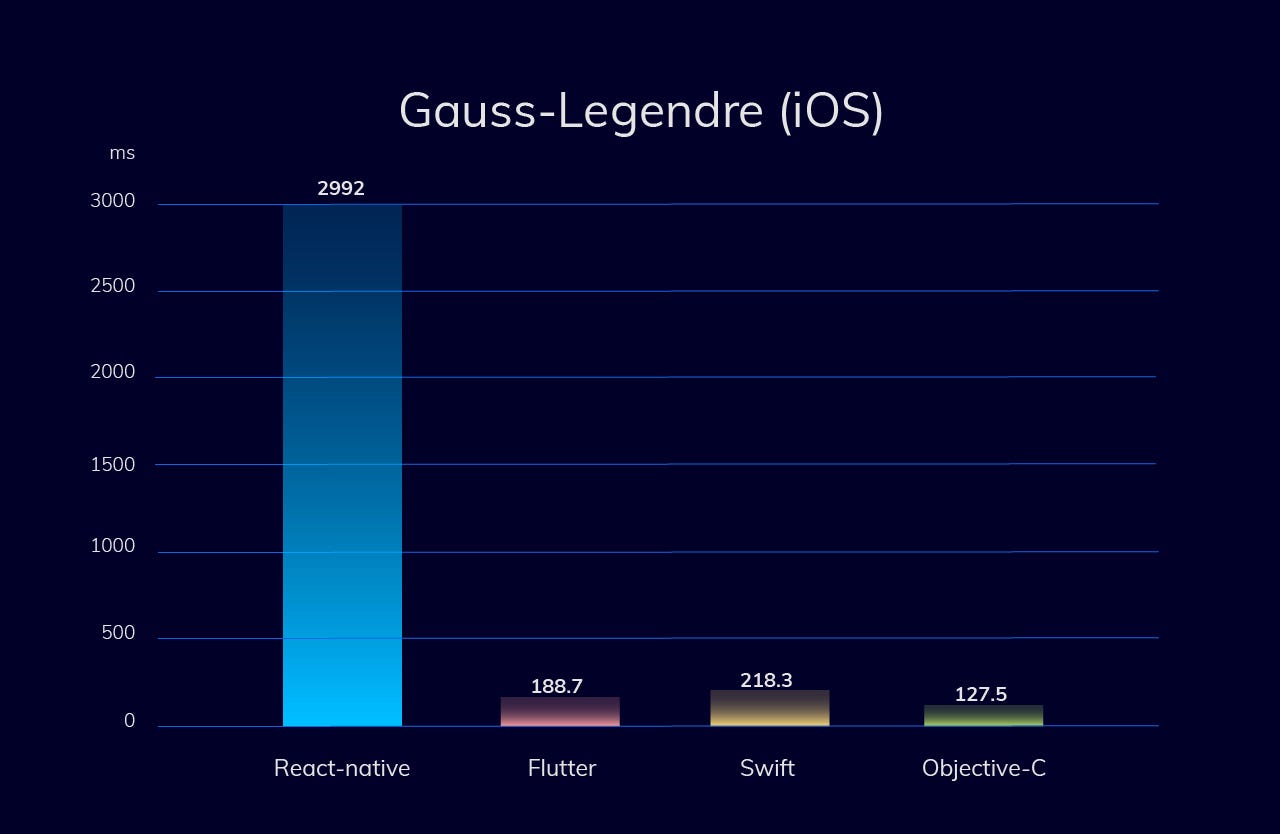
CPU-intensive test (Gauss–Legendre algorithm) for iOS

iOS
- Objective-C is the best programming language for iOS development. Swift is 1.7 times slower compared to Objective C.
- Surprise: Flutter is a bit faster than Swift (on 15%).
- React Native is 20 times slower than Objective C.
CPU-intensive test (Borwein algorithm) for iOS


iOS
- Objective C is the best option for iOS app development. Swift is 1.9 times slower compared to Objective-C.
- Flutter is 5 times slower than Swift.
- React Native version is more than 15 times slower than the Swift version.
CPU-intensive test (Gauss–Legendre algorithm) for Android


Android
- Java and Kotlin have similar performance indications and are the best options for Android development.
- Flutter is approximately 20% slower than native.
- React Native is around 15 times slower than native.
CPU-intensive test (Borwein algorithm) for Android


Android
- Java and Kotlin have similar performance indications and are the best options for Android development.
- Native is 2 times faster then Flutter.
- React native is around 6 times slower than native.
Technical details:
- All tests have been done on real physical devices (iPhone 6s IOS 13.2.3 and Xiaomi Redmi Note 5 running under Android 9.0);
- We measured performance on release builds. In some cases, debug builds can be significantly slower than the release builds.
- All tests were run several times and the average result was calculated.
- Gauss–Legendre & Borwein algorithms of calculating Pi numbers were used. The Pi number has been calculated 100 times with 10 million digits precision.
- Gauss–Legendre is a more memory-intensive algorithm in comparison with Borwein, but Borwein is more CPU-intensive.
- Source code
Key takeaways
- In summary, not all cross-platform apps are slow. What’s more than that, Flutter apps have higher performance than Swift apps.
- Objective C and Flutter will be a wise choice if you want to develop a super-fast iOS app.
- For the apps with high load calculations Flutter is a good option for both, Android and iOS app development.
Please let inVerita know if you struggle with picking a mobile tool for development, always happy to help.
Authors:
Ihor Demedyuk, Co-founder and CTO @ inVerita
Nazar Tsybulskyi, Flutter evangelist @ inVerita
Komentar
Posting Komentar
This Message